
Accumulate Points – Redeem Rewards
500 Snack Points – 5% OFF
1000 Snack Points – 10% OFF
1500 Snack Points – 15% OFF
2500 Snack Points – 20% OFF
You can view and redeem your Snack Points by logging into your account. To redeem your Snack Points, you must be SIGNED IN and apply the discount code issued to you on the payment page during checkout. Your discount code will also be emailed to you.
Coupon codes (including Snack Points) cannot be combined. One code is allowed per transaction. To view your Snack Points, simply go to click on the Snack Club widget at the bottom of this page.
Instructions to Claim Snack Club Points
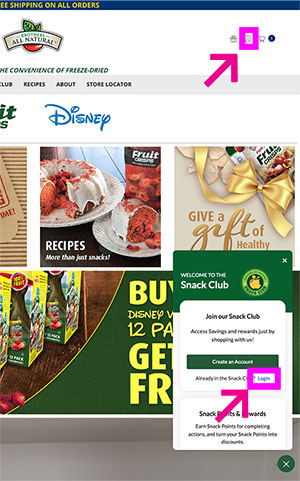
Step 1. Log into your account, either by clicking on the Head icon on the top right of the screen (Desktop) or "Sign in" menu item on the (mobile) top Menu. You can also Click on the "Sign in" Link in the "Snack Club" pop up window.
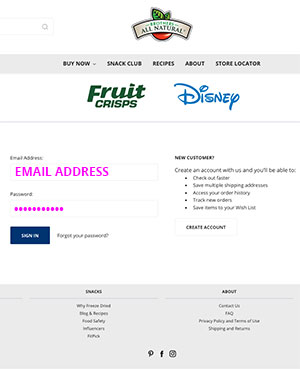
Step 2. Sign into your account using your email and password.
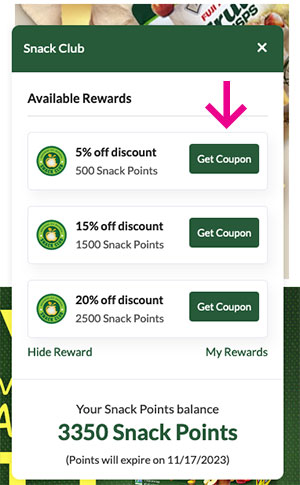
Step 3. Click on the snack Club Icon.

Step 4. Select the "Get Coupon" Button next to the discount you would like to claim.
Step 5. Copy your Coupon code. you will also receive this code in an email.

Step 6. Goto the check-out page and click on the "Add Coupon" Link

Step 7. Paste your coupon code in the "Coupon Code" field and click the "Apply" button next to the field.

Step 8. Your Coupon has now been applied to your order.

Step 9. If you need to retrieve your coupon to use at a later date, it can be retrieved from your email sent to the address associated with your account.

Comments
0 comments
Please sign in to leave a comment.